Document Type | Troubleshooting
Category | Monitoring/Inspection
Applicable Product Version | 6FS06
Document Number | TMOTS007
Issue
In a Windows environment, there have been cases where no logs are generated even though the database has abnormally terminated.
Cause
In the Windows environment, when the DB abnormally terminates, the Dump file was not created.
Solutions
The following settings are required to allow dump generation.
Registry Registration
reg add "HKLM\SOFTWARE\Microsoft\Windows\Windows Error Reporting\LocalDumps\tbsvr.exe" /v DumpFolder /t REG_EXPAND_SZ /d "C:\Users\user\Desktop\Tmax\test_dump" /f
reg add "HKLM\SOFTWARE\Microsoft\Windows\Windows Error Reporting\LocalDumps\tbsvr.exe" /v DumpCount /t REG_DWORD /d 20 /f
reg add "HKLM\SOFTWARE\Microsoft\Windows\Windows Error Reporting\LocalDumps\tbsvr.exe" /v DumpType /t REG_DWORD /d 1 /f
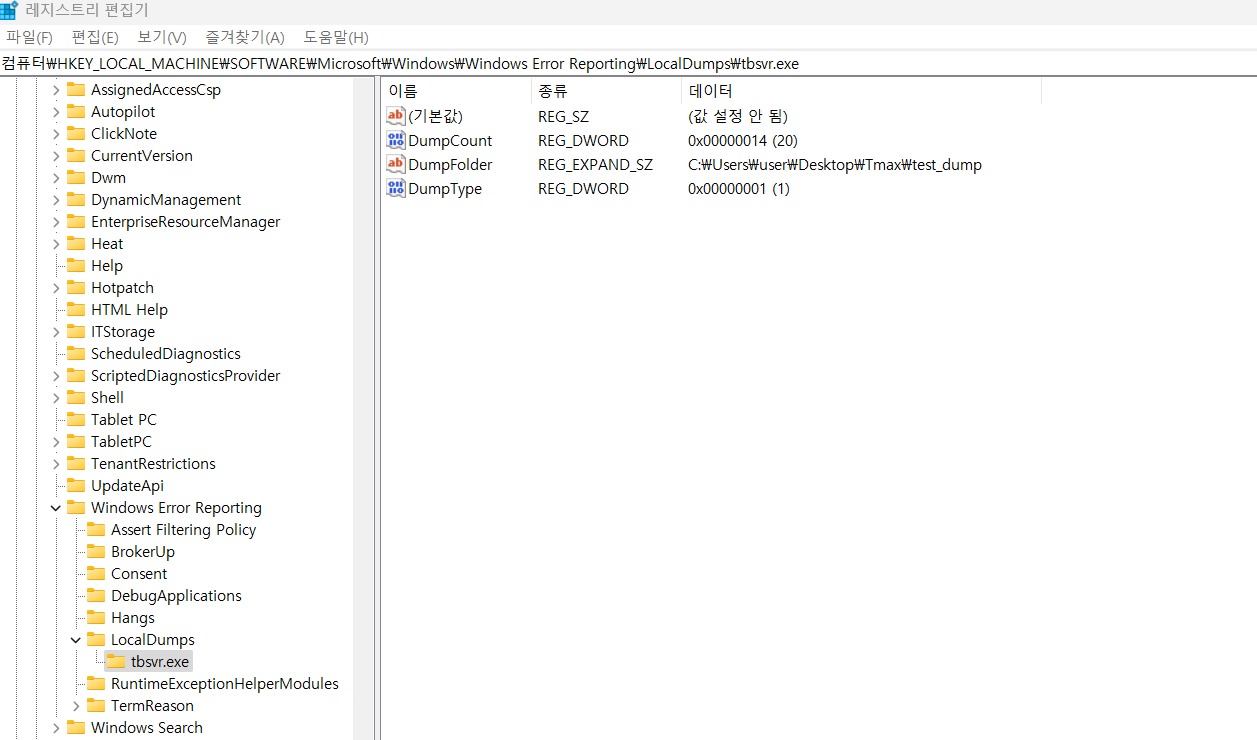
- DumpCount : 20
→ Keeps up to 20 dump files.
- DumpType : 1
→ Creates a minidump.
- DumpFolder : C:\Users\user\Desktop\Tmax\test_dump
→ Dumps are created in the specified folder, and the folder must be created in advance.