Document Type | Technical Information
Category | Administration
Applicable Product Versions | 6FS07, 6FS07PS, 7FS02, 7FS02PS
Document Number | TADTI040
Overview
This explains how to automatically restart the Tibero process after rebooting the Windows OS.
Method
1. Access Computer Management
Run by typing "Computer Management" in the search box on the taskbar or Start menu.
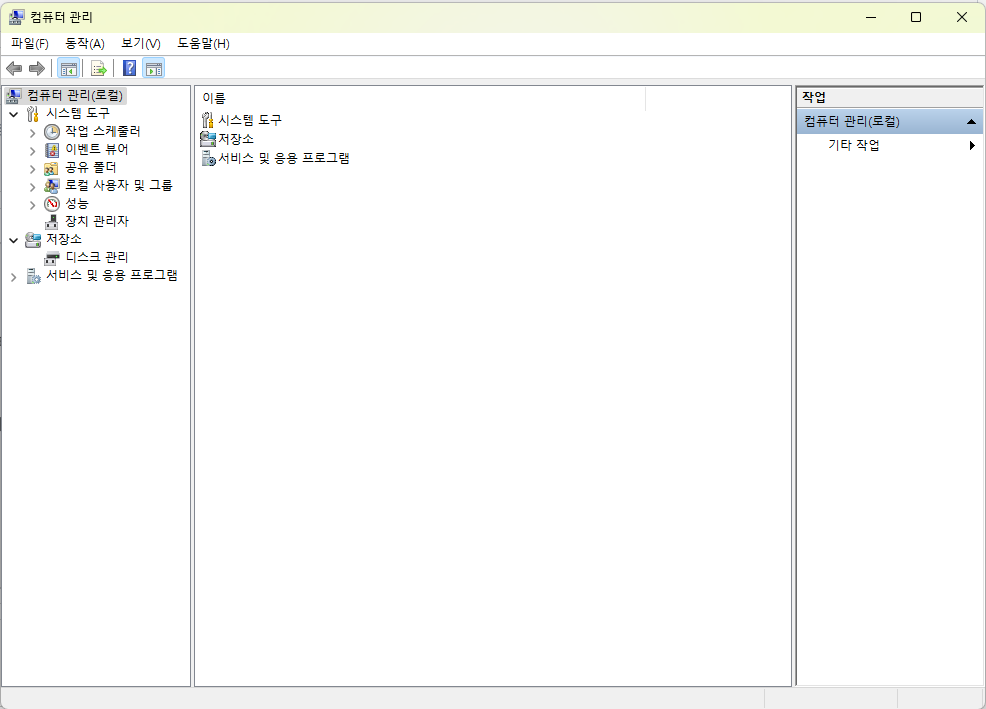
[Figure 1. Computer Management Access Screen]
2. Change Tibero Service Startup Type to Automatic in Services and Applications
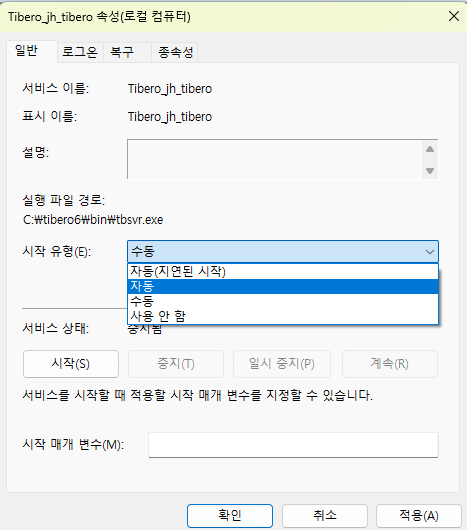
[Figure 2] Tibero_jh_tibero Properties Screen
3. Shut Down Tibero DB Instance
Shut down the instance first to apply the settings.
4. Add Parameters to %TB_HOME%/config/%TB_SID%.tip File
Add the following parameters to the file.
BOOT_WITH_AUTO_DOWN_CLEAN=Y
_LOG_OS_INFO=N
5. Start Tibero DB Instance
Restart the instance to apply the changed settings.
6. Verify Automatic DB Startup After OS Reboot
Check if the Tibero instance starts automatically after reboot.