Document Type | Technical Information
Category | Tuning
Applicable Product Versions | 6FS06, 6FS07, 6FS07PS, 7FS01, 7FS02, 7FS02PS
Document Number | TTUTI008
Overview
This document guides you through two methods to change Tibero parameters.
Methods
Check if Dynamic Change is Possible
First, check if the parameter you want to change can be dynamically modified by querying as follows.
select * from vt_parameter;
The query will output as shown below.
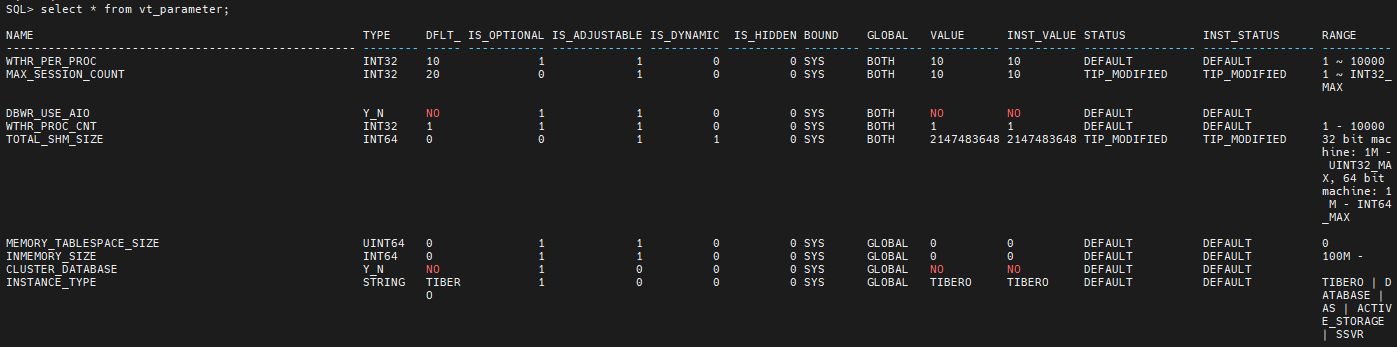
CautionIf the S_DYNAMIC value is '1', dynamic change is possible. If the value is '0' and you attempt to change it, the following error (TBR-7198) will occur.
Dynamic Change
Apply the parameter value as shown below, then query vt_parameter to verify if the value has changed.
alter system set [Parameter Name] = [Value];
Static Change
If the IS_DYNAMIC value is '0' after querying vt_parameter, write the parameter in the SID.tip file.
- Navigate to cd $TB_HOME/config/
- Open vi $TB_SID.tip or vi [DB SID name].tip
- Enter the desired "[Parameter Name]=[Value]"
- Restart the DB and query vt_parameter to confirm if the value has changed
NoteIf the parameter to be changed supports dynamic modification, only the connected session can change the parameter. Also, parameters changed dynamically will be reset upon DB restart, so to apply changes persistently, it is necessary to configure the parameter changes in the $TB_SID.tip file.