Document Type | Technical Information
Category | Interface/Integration
Document Number | TIITI014
Overview
This explains the method of integrating Tibero with the JBoss 7.x environment.
It is assumed that Tibero is installed on the same server, and from now on the installation location of Tibero is indicated as $TB_HOME.
Detailed explanations of configuration items are omitted; for more information, please refer to the official JBoss documentation or the RedHat community.
NoteTesting was conducted under the following environment.
Method
Deploy (install) JDBC Driver
In JBoss 7.x, the JDBC Driver is registered as a module deploy.
To do this, create the following path and file under the modules directory in the directory where JBOSS is installed (hereafter $JBOSS_HOME).
1. Create module deployment directory
Create the com/tibero/main directory under $JBOSS_HOME/modules.
$ mkdir –p $JBOSS_HOME/modules/com/tibero/main
2. Copy Tibero JDBC Driver file
Copy the Tibero JDBC Driver file into the directory you just created.
$ cp $TB_HOME/client/lib/jar/tibero6-jdbc.jar $JBOSS_HOME/modules/com/tibero/main
3. Create module.xml file
Create a module.xml file inside the directory as follows.
<module xmlns="urn:jboss:module:1.0" name="com.tibero">
  <resources>
    <resource-root path="tibero6-jdbc.jar"/>
  </resources>
  <dependencies>
    <module name="javax.api"/>
  </dependencies>
</module>
At this time, the module name must be written in the same structure as the directory path (com.tibero).
Modify JBoss Server Configuration File
Add a DataSource to the server configuration file.
For this test, standalone server was used, so modify the $JBOSS_HOME/standalone/configuration/standalone.xml file.
If you are using a Domain environment, modify the $JBOSS_HOME/domain/configuration/domain.xml file.
<?xml version='1.0' encoding='UTF-8'?>
<server xmlns="urn:jboss:domain:1.2">
  <management>
    -- omitted --
  </management>
  <profile>
    <subsystem xmlns="urn:jboss:domain:logging:1.1">
      -- omitted --
    <subsystem xmlns="urn:jboss:domain:datasources:1.0">
      <datasources>
        <datasource
            jndi-name="java:/TiberoDS"
            pool-name="TiberoDS"  enabled="true"
            use-java-context="true">
          <connection-url>jdbc:tibero:thin:@localhost:8629:tb6</connection-url>
          <driver>tibero</driver>
          <security>
            <user-name>tibero</user-name>
            <password>tmax</password>
          </security>
        </datasource>
        <drivers>
          <driver name="tibero" module="com.tibero">
            <xa-datasource-class>com.tmax.tibero.jdbc.TbDriver</xa-datasource-class>
          </driver>
        </drivers>
      </datasources>
    </subsystem>
    <subsystem xmlns="urn:jboss:domain:weld:1.0"/>
  </profile>
  <socket-binding-group
      name="standard-sockets"
      default-interface="public"
      port-offset="${jboss.socket.binding.port-offset:0}">
    -- omitted --
  </socket-binding-group>
</server>
Set the driver name marked in blue to the same (tibero), and the module marked in red to the same module name (com.tibero) created in ‘3. Create module.xml file’.
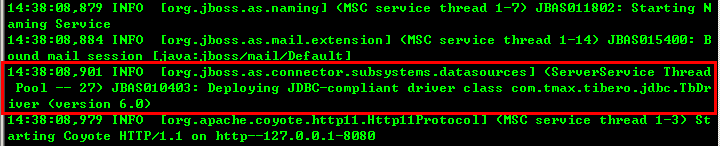
After completion, when you start JBoss, you can confirm that the JDBC driver is deployed as shown below.