Document Type | Technical Information
Category | Interface/Integration
Applicable Product Version | 6FS07
Document Number | TIITI026
Overview
ALTIBASE supports the DBLink function provided by TIBERO RDBMS through JAVA GATEWAY, similar to MS-SQL SERVER and Sybase ASE.
ALTIBASE DBLink outputs the query results requested by the user through the route shown in the diagram below.
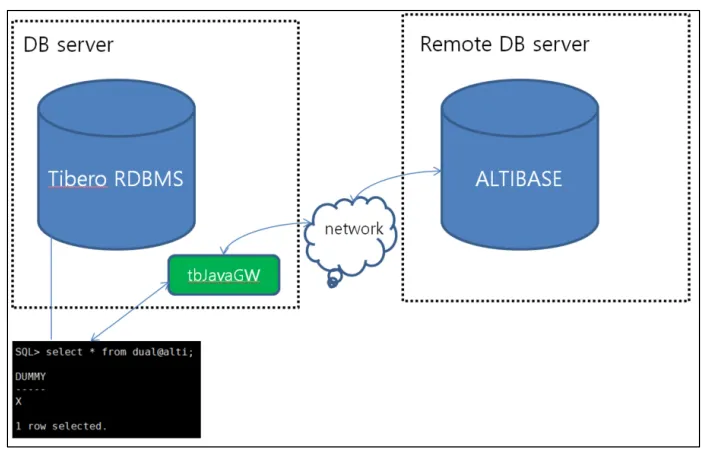
This document guides you through the preliminary step of installing the JAVA GATEWAY for using TIBERO TO ALTIBASE DBLink.
NoteThis document was prepared under the following conditions.
Method
1. Extract JAVA Gateway Files
Copy the Java gateway to your desired path and then extract the archive.
- Java gateway file location: $TB_HOME/client/bin/tbJavaGW.zip
Upon extraction, a tbJavaGW directory is created, and the files inside the directory are as follows.
$ tree tbJavaGW
tbJavaGW
├── jgw.cfg
├── jgw_service.bat
├── jgwlog.properties
├── lib
│ ├── commons-collections.jar
│ ├── commons-daemon-1.0.6.jar
│ ├── commons-pool.jar
│ ├── log4j-1.2.15.jar
│ └── tbgateway.jar
└── tbgw
2. Add JDBC-related jar File
2.1. Copy and extract the Java gateway to your desired path.
2.1. Copy the Altibase.jar file, which is the JDBC-related jar file of ALTIBASE, into the tbJavaGW/lib directory.
- Using sftp/scp: /home/altibase/altibase_home/lib/Altibase.jar -> $TB_HOME/client/bin/tbJavaGW/lib/Altibase.jar
Altibase server jar file location
[altibase@ ~]$ locate Altibase.jar
/home/altibase/altibase_home/lib/Altibase.jar
Tibero server tbJavaGW/lib location
[tibero1@ ~]$ locate tbJavaGW/lib
/home/tibero1/tibero6/client/bin/tbJavaGW/lib
Note
During testing for this document, the Altibase.jar from the ALTIBASE server was added under tbJavaGW/lib on the Tibero server.
3. Add Parameters (Environment Variables)
Modify the settings related to the gateway by specifying parameter values in the tbgw file.
#! /bin/sh
#Classpath
commonsdaemon=./lib/commons-daemon-1.0.6.jar
commonspool=./lib/commons-pool.jar
commonscollections=./lib/commons-collections.jar
log4j=./lib/log4j-1.2.15.jar
msjdbc=./lib/sqljdbc.jar:./lib/sqljdbc4.jar
asejdbc=./lib/jconn3.jar
postgresqljdbc=./lib/postgresql-8.4-701.jdbc3.jar
gateway=./lib/tbgateway.jar
altijdbc=./lib/Altibase.jar

#log4j properties
#log4jfile must be exists on classpath
log4jfile=jgwlog.properties

#Main Class
mainclass=com.tmax.tibero.gateway.main.GatewayMain
configfile=./jgw.cfg

if [[ $# -gt 0 ]] && [[ $1 = "-v" ]] ; then
 java -jar $gateway
else
 java -Xms128m -Xmx512m -Dlog4j.configuration=$log4jfile -classpath
$commonsdaemon:$commonspool:$commonscollections:$log4j:$gateway:$altijdbc:$msjdbc:$asejdbc:$postgresqljd
bc:. $mainclass CONFIG=$configfile $* &
 sleep 1
fi
SQL
4. Grant Execution Permission to tbgw File
Grant execution permission to the tbgw file inside tbJavaGW.
- $chmod +x tbgw
5. Modify jgw.cfg File Settings
Change the DATABASE and DATASOURCE_CLASS_NAME parameters in jgw.cfg.
How to Check DATASOURCE_CLASS_NAME
Method 1. Check the DATASOURCE setting guide on the altibase homepage
Method 2. Check after extracting the Altibase.jar archive
Check DATASOURCE with Altibase.jar
$ jar -xvf Altibase.jar # Extract classes inside the jar archive to check
$ ls –arlt # Confirm META-INF, Altibase directories are created
drwxr-xr-x. 3 tibero1 dba 41 Sep 18 17:17 META-INF
drwxr-xr-x. 3 tibero1 dba 18 Nov 2 14:51 Altibase

$ cd ./Altibase/jdbc/driver

$ ls -arlt | grep DataSource
-rw-r--r--. 1 tibero1 dba 6770 Sep 18 17:17 AltibaseDataSource.class
-rw-r--r--. 1 tibero1 dba 1681 Sep 18 17:17 AltibaseXADataSource.class
-rw-r--r--. 1 tibero1 dba 3851 Sep 18 17:17 AltibaseDataSourceManager.class
-rw-r--r--. 1 tibero1 dba 1848 Sep 18 17:17 AltibaseDataSourceFactory.class
-rw-r--r--. 1 tibero1 dba 1703 Sep 18 17:17 AltibaseConnectionPoolDataSource.class
Simplified jgw.cfg Contents
# Target database setting
DATABASE=ALTIBASE

# Datasource class name for target database
DATASOURCE_CLASS_NAME=Altibase.jdbc.driver.AltibaseConnectionPoolDataSource

# Listener port
LISTENER_PORT=9093

# Initial thread pool size
INIT_POOL_SIZE=10

# Max thread pool size
MAX_POOL_SIZE=100

# Max cursor cache size per thread
MAX_CURSOR_CACHE_SIZE=100

# Gateway Encoding-"ASCII", "EUC-KR", "MSWIN949", "UTF-8", "UTF-16", "SHIFT-JIS"
ENCODING=MSWIN949

# Max length for Types.LONGVARCHAR
MAX_LONGVARCHAR=4K

# Max length for Types.LONGRAW
MAX_LONGRAW=4K