Document Type | Technical Information
Category | Administration
Applicable Product Versions | Tibero5, Tibero6, Tibero7
Document Number | TADTI158
Overview
This document describes the phenomena that occur when using server-dependent objects created in a TSC environment, due to lack of synchronization of these dependent objects, and provides workarounds for these issues.
Typical examples of server-dependent objects include External Procedures (C, JAVA) and External Tables.
The use of External objects is not officially recommended in a TSC environment.
However, there may be unavoidable cases where external objects are used in a TSC environment, such as when using third-party solutions (encryption/decryption, etc.) or user-created external objects.
In such environments, external object files created on the Primary server are not synchronized to the Standby server. Therefore, if a fail-over to the Standby server occurs, errors may arise because the object files cannot be found.
If such a situation occurs, you can resolve the issue by referring to and applying the workarounds described in this document.
Method
TSC Restrictions
TSC operates by sending REDO information from the Primary node to the Standby node, and performing data synchronization in recovery mode on the Standby node.
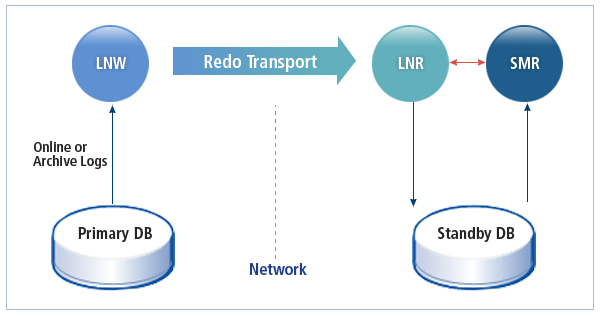
Since REDO information does not include server-dependent object files, the Standby node cannot synchronize these files.
The structure of the object is synchronized, but the files referenced by the object are not.
For more detailed restrictions in the TSC environment, please refer to the TSC Restrictions section in the online manual.
If a developer or administrator creates and uses server-dependent objects without knowledge of the TSC environment, the following errors may occur when performing a FAIL-OVER to the Standby due to a Primary failure.
-- When the External C Procedure library file does not exist on Standby
 TBR-140004: Failed to open library ('/tibero/tibero_engine/database/external_procedure/libextproc.so') - /tibero/tibero_engine/database/external_procedure/libextproc.so: cannot open shared object file: No such file or directory.

-- When the External JAVA Procedure library file does not exist on Standby
TBR-150008:Invalid class name. - SimpleMath

 -- When the External Table load data file does not exist on Standby
 TBR-80011: Unable to open data file.
External Procedure Workaround
External C Procedure
- Create C library on Primary
$ mkdir -p /tibero/tibero_engine/database/external_procedure/
$ cd /tibero/tibero_engine/database/external_procedure/
$ cat extproc.c
long find_max(long x, long y)
{
    if (x >= y) return x;
    else return y;
}

$ cc -g -fpic -shared -o libextproc.so extproc.c
$ ls
extproc.c  libextproc.so
- Create LIBRARY object on Primary
SQL> CREATE LIBRARY extproc IS '/tibero/tibero_engine/database/external_procedure/libextproc.so';


Library 'EXTPROC' created.


OWNER                LIBRARY_NAME         FILE_SPEC                                                              STATUS
-------------------- -------------------- ---------------------------------------------------------------------- ---------------
TIBERO               EXTPROC              /tibero/tibero_engine/database/external_procedure/libextproc.so        VALID
- Check LIBRARY object creation on Primary
set linesize 150
col owner for a20
col library_name for a20
col file_spec for a70
col status for a15

SQL> select owner, library_name, file_spec, status from dba_libraries ;

OWNER                LIBRARY_NAME         FILE_SPEC                                                              STATUS
-------------------- -------------------- ---------------------------------------------------------------------- ---------------
TIBERO               EXTPROC              /tibero/tibero_engine/database/external_procedure/libextproc.so        VALID
-
Check LIBRARY object creation on Standby
The object structure is reflected on Standby.
set linesize 150
col owner for a20
col library_name for a20
col file_spec for a70
col status for a15

SQL> select owner, library_name, file_spec, status from dba_libraries ;

OWNER                LIBRARY_NAME         FILE_SPEC                                                              STATUS
-------------------- -------------------- ---------------------------------------------------------------------- ---------------
TIBERO               EXTPROC              /tibero/tibero_engine/database/external_procedure/libextproc.so        VALID
- Create FUNCTION object dependent on C LIBRARY on Primary
SQL> CREATE OR REPLACE FUNCTION ext_find_max(num1 BINARY_INTEGER, num2 BINARY_INTEGER)
  RETURN BINARY_INTEGER
  AS LANGUAGE C
  LIBRARY extproc
  NAME "find_max"
  PARAMETERS(num1 int, num2 int);

Function 'EXT_FIND_MAX' created.
- Check FUNCTION object dependent on C LIBRARY on Primary
set linesize 150
col owner for a20
col object_name for a20
col object_type for a15
col status for a15

SQL> select owner, object_name, object_type, status from dba_objects where object_name='EXT_FIND_MAX';

OWNER                OBJECT_NAME          OBJECT_TYPE     STATUS
-------------------- -------------------- --------------- ---------------
TIBERO               EXT_FIND_MAX         FUNCTION        VALID

1 row selected.
- Check FUNCTION object dependent on C LIBRARY on Standby
set linesize 150
col owner for a20
col object_name for a20
col object_type for a15
col status for a15

SQL> select owner, object_name, object_type, status from dba_objects where object_name='EXT_FIND_MAX';

OWNER                OBJECT_NAME          OBJECT_TYPE     STATUS
-------------------- -------------------- --------------- ---------------
TIBERO               EXT_FIND_MAX         FUNCTION        VALID

1 row selected.
-
Using FUNCTION created on Primary
You can confirm it works normally.
SQL> create table tbl(col1 nubmer, col2 number);
SQL> insert into tbl values(1, 2);
SQL> insert into tbl values(5, 3);
SQL> insert into tbl values(7, 9);
SQL> commit;
SQL> select * from tbl;

      COL1       COL2
---------- ----------
         1          2
         5          3
         7          9

3 rows selected.

SQL> select col1, col2, ext_find_max(col1, col2) as max from tbl;

      COL1       COL2        MAX
---------- ---------- ----------
         1          2          2
         5          3          5
         7          9          9

3 rows selected.
-
Using FUNCTION created on Standby
Since the C LIBRARY file is not synchronized, a TBR-140004 error occurs.
SQL> select * from tbl;

      COL1       COL2
---------- ----------
         1          2
         5          3
         7          9

3 rows selected.

SQL> select col1, col2, ext_find_max(col1, col2) as max from tbl;
TBR-140004: Failed to open library ('/tibero/tibero_engine/database/external_procedure/libextproc.so') - /tibero/tibero_engine/database/external_procedure/libextproc.so: cannot open shared object file: No such file or directory.
-
Copy server-dependent C LIBRARY file to Standby
Copy the C LIBRARY file from Primary to Standby.
$ mkdir -p /tibero/tibero_engine/database/external_procedure
$ ls /tibero/tibero_engine/database/external_procedure
libextproc.so
-
Use FUNCTION on Standby
Since the C LIBRARY file also exists on Standby, it works normally.
SQL> select * from tbl;

      COL1       COL2
---------- ----------
         1          2
         5          3
         7          9

3 rows selected.

SQL> select col1, col2, ext_find_max(col1, col2) as max from tbl;

      COL1       COL2        MAX
---------- ---------- ----------
         1          2          2
         5          3          5
         7          9          9

3 rows selected.
External JAVA Procedure
JAVA SOURCE object creation restriction in TSC environment
If a JAVA SOURCE object was created while operating in a single environment and then changed to a TSC configuration, the JAVA SOURCE applied in the single environment may still be used.
TBR-1040: Not permitted while standby database is connected.
- Check JAVA SOURCE on Primary
set linesize 150
col owner for a20
col object_name for a20
col object_type for a15
col status for a15

SQL> select owner, object_name, object_type, status from dba_objects where object_name='JAVAEXTPROC';

OWNER                OBJECT_NAME          OBJECT_TYPE     STATUS
-------------------- -------------------- --------------- ---------------
TIBERO               JAVAEXTPROC          JAVA            VALID

1 row selected.


SQL> show param JAVA_CLASS_PATH

NAME                                                                   TYPE     VALUE
---------------------------------------------------------------------- -------- --------------------------------------------------------------------
JAVA_CLASS_PATH                                                        DIRNAME  /tibero/tibero_engine/database/external_java/

SQL> !tree /tibero/tibero_engine/database/external_java/
/tibero/tibero_engine/database/external_java/
└── TIBERO
    ├── 96.error
    └── SimpleMath.class

1 directory, 2 files
-
Check JAVA SOURCE on Standby
JAVA LIBRARY files are not synchronized, so they do not exist on Standby.
set linesize 150
col owner for a20
col object_name for a20
col object_type for a15
col status for a15

SQL> select owner, object_name, object_type, status from dba_objects where object_name='JAVAEXTPROC';

OWNER                OBJECT_NAME          OBJECT_TYPE     STATUS
-------------------- -------------------- --------------- ---------------
TIBERO               JAVAEXTPROC          JAVA            VALID

1 row selected.


SQL> show param JAVA_CLASS_PATH

NAME                                                                   TYPE     VALUE
---------------------------------------------------------------------- -------- --------------------------------------------------------------------
JAVA_CLASS_PATH                                                        DIRNAME  /tibero/tibero_engine/database/external_java/

SQL> !tree /tibero/tibero_engine/database/external_java/
/tibero/tibero_engine/database/external_java/ [error opening dir]

0 directories, 0 file
- Create FUNCTION on Primary
SQL> CREATE OR REPLACE FUNCTION find_max(x PLS_INTEGER, y PLS_INTEGER)
     RETURN PLS_INTEGER IS
     LANGUAGE JAVA NAME 'SimpleMath.findMax(int, int) return int';
     /

Function 'FIND_MAX' created.
- Check FUNCTION creation on Primary
set linesize 150
col owner for a20
col object_name for a20
col object_type for a15
col status for a15

SQL> select owner, object_name, object_type, status from dba_objects where object_name='FIND_MAX';

OWNER                OBJECT_NAME          OBJECT_TYPE     STATUS
-------------------- -------------------- --------------- ---------------
TIBERO               FIND_MAX             FUNCTION        VALID

1 row selected.
-
Check FUNCTION creation on Standby
The structure of the object is synchronized on Standby.
set linesize 150
col owner for a20
col object_name for a20
col object_type for a15
col status for a15

SQL> select owner, object_name, object_type, status from dba_objects where object_name='FIND_MAX';

OWNER                OBJECT_NAME          OBJECT_TYPE     STATUS
-------------------- -------------------- --------------- ---------------
TIBERO               FIND_MAX             FUNCTION        VALID

1 row selected.
- Use FUNCTION on Primary
SQL> select find_max(4,60) from dual;

FIND_MAX(4,60)
--------------
            60

1 row selected.
-
Use FUNCTION on Standby
When using External JAVA Procedure, the epa process must be running, but it is not started on the Standby node.
SQL> select find_max(4,60) from dual;
TBR-15138: Generic I/O error: Failed to connect Java External Procedure Agent.

$ ps -ef
UID          PID    PPID  C STIME TTY          TIME CMD
root          64       1  0 Dec17 ?        00:01:48 tbcm       -CM_SID standby
root          65      64  0 Dec17 ?        00:00:02 tbcm_guard -CM_SID standby
tibero      382165       1 10 03:04 pts/2    00:00:00 tbsvr          -t recovery -SVR_SID testdb_s
tibero      382166  382165  0 03:04 pts/2    00:00:00 /tibero/tibero_engine/bin/tblistener -n 11 -t RECOVERY -SVR_SID testdb_s
tibero      382172  382165  0 03:04 pts/2    00:00:00 tbsvr_MGWP     -t recovery -SVR_SID testdb_s
tibero      382173  382165  0 03:04 pts/2    00:00:00 tbsvr_FGWP000  -t recovery -SVR_SID testdb_s
tibero      382182  382165  0 03:04 pts/2    00:00:00 tbsvr_FGWP009  -t recovery -SVR_SID testdb_s
tibero      382183  382165  0 03:04 pts/2    00:00:00 tbsvr_PEWP000  -t recovery -SVR_SID testdb_s
tibero      382184  382165  0 03:04 pts/2    00:00:00 tbsvr_PEWP001  -t recovery -SVR_SID testdb_s
tibero      382187  382165  0 03:04 pts/2    00:00:00 tbsvr_PEWP004  -t recovery -SVR_SID testdb_s
tibero      382188  382165  1 03:04 pts/2    00:00:00 tbsvr_AGNT     -t recovery -SVR_SID testdb_s
tibero      382189  382165  0 03:04 pts/2    00:00:00 tbsvr_DBWR     -t recovery -SVR_SID testdb_s
tibero      382190  382165  1 03:04 pts/2    00:00:00 tbsvr_RCWP     -t recovery -SVR_SID testdb_s
tibero      382191  382165  0 03:04 pts/2    00:00:00 tbsvr_SCSD     -t recovery -SVR_SID testdb_s
tibero      382420  363314  0 03:04 pts/2    00:00:00 ps -ef
-
Perform FAIL-OVER to Standby
As FAIL-OVER occurs to Standby, the epa process is started.
$ ps -ef
UID          PID    PPID  C STIME TTY          TIME CMD
root          64       1  0 Dec17 ?        00:01:48 tbcm       -CM_SID standby
root          65      64  0 Dec17 ?        00:00:02 tbcm_guard -CM_SID standby
tibero      382780       1 21 03:05 pts/2    00:00:00 tbsvr          -t failover -SVR_SID testdb_s
tibero      382781  382780  0 03:05 pts/2    00:00:00 /tibero/tibero_engine/bin/tblistener -n 11 -t NORMAL -SVR_SID testdb_s
tibero      382782  382780  0 03:05 pts/2    00:00:00 tbsvr_MGWP     -t failover -SVR_SID testdb_s
tibero      382783  382780  0 03:05 pts/2    00:00:00 tbsvr_FGWP000  -t failover -SVR_SID testdb_s
tibero      382792  382780  0 03:05 pts/2    00:00:00 tbsvr_FGWP009  -t failover -SVR_SID testdb_s
tibero      382793  382780  0 03:05 pts/2    00:00:00 tbsvr_PEWP000  -t failover -SVR_SID testdb_s
tibero      382794  382780  0 03:05 pts/2    00:00:00 tbsvr_PEWP001  -t failover -SVR_SID testdb_s
tibero      382797  382780  0 03:05 pts/2    00:00:00 tbsvr_PEWP004  -t failover -SVR_SID testdb_s
tibero      382798  382780 10 03:05 pts/2    00:00:00 tbsvr_AGNT     -t failover -SVR_SID testdb_s
tibero      382799  382780  1 03:05 pts/2    00:00:00 tbsvr_DBWR     -t failover -SVR_SID testdb_s
tibero      382800  382780  5 03:05 pts/2    00:00:00 tbsvr_RCWP     -t failover -SVR_SID testdb_s
tibero      382801  382780  0 03:05 pts/2    00:00:00 tbsvr_SCSD     -t failover -SVR_SID testdb_s
tibero      382802  382780 34 03:05 pts/2    00:00:00 java -verbose:gc -Xms128m -Xmx512m -Djepa.home=/tibero/tibero_engine/client/epa/
tibero      383046  363314  0 03:05 pts/2    00:00:00 ps -ef
-
Execute FUNCTION on Standby
Although the epa process required to execute the External JAVA Procedure is started, a TBR-150008 error occurs because the JAVA LIBRARY file is not synchronized.
SQL> select find_max(4,60) from dual;
TBR-150008:Invalid class name. - SimpleMath
-
Copy JAVA CLASS file to Standby
Copy the JAVA LIBRARY file from Primary.
$ mkdir -p /tibero/tibero_engine/database/external_java/TIBERO
$ ls /tibero/tibero_engine/database/external_java/TIBERO
SimpleMath.class
-
Execute FUNCTION on Standby
Since the JAVA LIBRARY file exists on Standby, it executes normally.
SQL> select find_max(4,60) from dual;

FIND_MAX(4,60)
--------------
            60


1 row selected.
External Table
- Create DIRECTORY to recognize the path of the External Table's Load File
SQL> CREATE OR REPLACE DIRECTORY dir_external as '/tibero/tibero_engine/database/external';
- Create file for External Table on Primary
$ cat /tibero/tibero_engine/database/external/data.csv
1,test1,testtest1,1000
2,test2,testtest2,2000
3,test3,testtest3,3000
- Check on Primary
set linesize 200
col name for a50
col path for a100

SQL> select name,path from dba_directories where name='DIR_EXTERNAL';

NAME                                               PATH
-------------------------------------------------- ----------------------------------------------------------------------------------------------------
DIR_EXTERNAL                                       /tibero/tibero_engine/database/external

SQL> !ls /tibero/tibero_engine/database/external
data.csv
-
Check on Standby
Since the Load File for the External Table is not synchronized to Standby, you cannot find the file.
set linesize 200
col name for a50
col path for a100
SQL> select name,path from dba_directories where name='DIR_EXTERNAL';

NAME                                               PATH
-------------------------------------------------- ----------------------------------------------------------------------------------------------------
DIR_EXTERNAL                                       /tibero/tibero_engine/database/external

SQL> !ls /tibero/tibero_engine/database/external
ls: cannot access '/tibero/tibero_engine/database/external': No such file or directory
- Create External Table on Primary
create table table_external
(
	col1 number,
	col2 varchar(10),
	col3 varchar(10),
	col4 number
)
organization external
(
	default directory dir_external
	access parameters(
		load data
		fields terminated by ','
		(col1,col2,col3,col4)
	)
	location(
		'data.csv'
	)
);
- Check on Primary
set linesize 200
col owner for a50
col table_name for a100

SQL> select owner, table_name from dba_tables where table_name='TABLE_EXTERNAL';

OWNER                                              TABLE_NAME
-------------------------------------------------- ----------------------------------------------------------------------------------------------------
TIBERO                                             TABLE_EXTERNAL
-
Check on Standby
The structure of the External Table is synchronized.
set linesize 200
col owner for a50
col table_name for a100

SQL> select owner, table_name from dba_tables where table_name='TABLE_EXTERNAL';

OWNER                                              TABLE_NAME
-------------------------------------------------- ----------------------------------------------------------------------------------------------------
TIBERO                                             TABLE_EXTERNAL
-
Query External Table on Primary
You can confirm that it is queried normally.
SQL> select * from TABLE_EXTERNAL;

      COL1 COL2       COL3             COL4
---------- ---------- ---------- ----------
         1 test1      testtest1        1000
         2 test2      testtest2        2000
         3 test3      testtest3        3000

3 rows selected.
-
Query External Table on Standby
Since the Load File is not synchronized to Standby, the following error occurs.
SQL> select * from TABLE_EXTERNAL;
TBR-80011: Unable to open data file.
-
Create Load Data file for External Table on Standby
Create or replicate the same Load File as on Primary.
$ mkdir /tibero/tibero_engine/database/external

$ cat /tibero/tibero_engine/database/external/data.csv
1,test1,testtest1,1000
2,test2,testtest2,2000
3,test3,testtest3,3000
-
Query External Table on Standby
The Load File is found on Standby and it works normally.
SQL> select * from TABLE_EXTERNAL;

      COL1 COL2       COL3             COL4
---------- ---------- ---------- ----------
         1 test1      testtest1        1000
         2 test2      testtest2        2000
         3 test3      testtest3        3000

3 rows selected.
Conclusion
If you want to use External objects in a TSC environment, you must synchronize the actual physical files of the External objects to the Standby node.
If your environment uses an encryption/decryption solution (External C Procedure), issues like those described in this document may occur. In environments where files used by External objects are not considered, FAIL-OVER to Standby may result in the inability to continue normal service, so management of External objects is necessary.