Document Type | Troubleshooting
Category | Interface/Integration
Document Number | TIITS015
Issue
When querying data using DB link (Tibero to Oracle), Korean characters are not displayed correctly.
Solutions
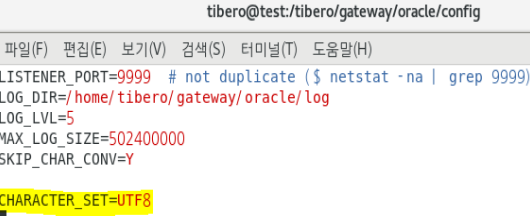
Modify the contents of $TBGW_HOME/config/tbgw.cfg to resolve the issue.
Applicable Environment: Tibero (MSWIN949) to ORACLE (UTF8)
1. Modify the contents of $TBGW_HOME/config/tbgw.cfg
Add CHARACTER_SET=UTF8 to tbgw.cfg and save the file.
2. Restart the gw4orcl gateway
After restarting, you can confirm that it operates normally.